
 United States
 United Kingdom
 Canada
 Australia
 New Zealand
 Ireland
Trevor Nace untangles the iPhone's three incoming-call screens
His fast-starting tutorial explains the missing Decline button, the banner option and how silencing differs from sending someone to voicemail.
 Trevor Nace
Story of
Why this story? The video opened at a pace of 44,140 views a day, 8 times a normal first day on this channel (5,514).
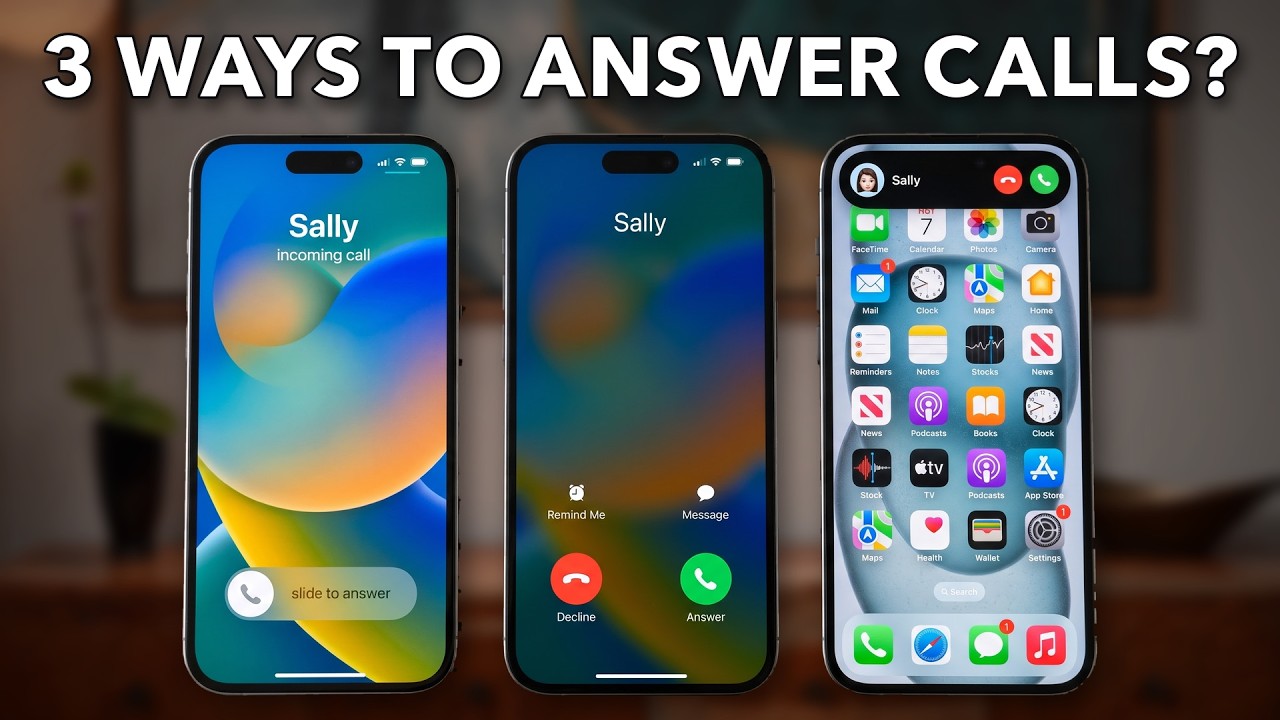 Why Do iPhones Have 3 Ways To Answer Calls?
Next story: Trevor Nace puts Siri on a button in battery-saving guide
Things we can learn from the video
Press to jump
- 0:35A locked iPhone uses Slide to Answer to help prevent accidental answering in a pocket.
- 1:21An unlocked phone can show Answer and Decline buttons, or a compact banner alert.
- 2:05Choose Banner or Full Screen under Settings > Apps > Phone > Incoming Calls.
- 2:42Press a volume or side button to silence an incoming call without immediately declining it.
- 3:12Double-press the side button to send an incoming call on a locked phone straight to voicemail.
- 3:31Swipe up on the compact call alert to dismiss it without declining the call.
Sometimes there's a Decline button. Sometimes there's only a slider. Trevor Nace's new tutorial answers a small but persistent iPhone question: why doesn't answering a call always look the same?
"Why Do iPhones Have 3 Ways To Answer Calls?" drew roughly 19,000 views in its first seven hours. Its estimated first-day pace is eight times Nace's usual opening for regular videos, a strong start for a lesson about something as ordinary as a ringing phone.
The main distinction is whether the phone is locked. Nace explains that sliding to answer helps prevent accidental answering in a pocket. With the phone unlocked, separate Answer and Decline buttons become available, or a compact banner can leave more of the screen free for whatever you're doing.
There's a choice involved, too. He walks through Settings > Apps > Phone > Incoming Calls, where viewers can select Banner or Full Screen. Several commenters favor the larger display; one explains that a small banner is easier to miss when the volume is down. Another viewer contributes a navigation shortcut: tapping the alphabet along the Apps list to jump to Phone rather than scrolling.
The final section answers the practical follow-up: what if you don't want to answer? Nace demonstrates pressing a volume or side button to silence a locked phone without immediately ending the call, and double-pressing the side button to send it to voicemail. Swiping away the compact call alert dismisses the interruption without declining the caller.
Published on Trari
Where next?


A professional in this field? Want to write about Tech on Trari? Tell us ›
What viewers say
How about all the ways to deny, screen, and avoid calls?
@bjgsdSee it on YouTubeFull screen because most of the time my volume is down and don’t notice I’m getting a call when it’s just a banner
@fluffykitten992See it on YouTubeIn case you didn’t know, when you’re in “apps” in settings, you don’t have to scroll. You can just tap the letters on the right side of the screen to jump to the apps that start with the letter you tap. So for example, for the Phone app just go to settings > apps and then tap the “P” on the right to jump down instantly to apps that start with the letter “P”.
@adamaj74See it on YouTube
1 more comment
I like the full screen thanks 😊
@AV1611-truthSee it on YouTube
Public comments from the video's page on YouTube
Want to know when somebody answers you?
 Is this your channel?For the channel's owners and team: a ready picture and text for your audience
Share the story with your audience. Everything is ready:
For an Instagram story or a WhatsApp status
For a community post or your channel's description
- Channel
- Trevor Nace
- Subscribers
- 1,570,000 ▲ 10,000 this week
- Channel views, last 7 days
- 5,312,713
- Channel views, pace per day
- 601,107 (on a normal day: 819,605)
- Video published
- November 15, 2026
- Video views so far
- 19,094 (less than a day online)
- Video views, pace per day
- 44,140
The numbers
The call-screen explainer is running well ahead of Nace's usual opening pace. Its first-day estimate is a projection, not a completed day's total.

💡 Test your knowledge
Which action does Nace demonstrate for sending a locked iPhone's incoming call straight to voicemail?
Nace distinguishes a double press, which sends the call to voicemail, from a single press that silences it.